App icon

LifeLyt

LifeLyt

LifeLyt

Amit Kairon

·

Photo & Video

Relive your best moments, every single day.

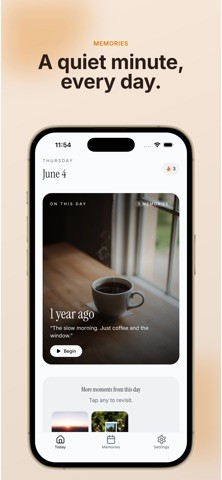
LifeLyt is a calm daily ritual that shows you photos from the same date in previous years. It's like having a time machine that brings back your favorite memories exactly when you need them.

HOW IT WORKS
• Open the app each day to see photos from this exact date, across every year
• Swipe through your "story stack" to revisit precious moments
• Add emoji reactions and personal notes to keep memories alive
• Build your streak by checking in daily — we track it for you

CONNECT YOUR MEMORIES
• Google Photos integration
• Facebook photo albums
• Dropbox storage
• Your device's camera roll

PREMIUM FEATURES
• Unlimited access to all memories (no 7-day limit)
• Connect unlimited photo sources
• Custom notification scheduling
• 100% ad-free and private experience

WHY LIFELYT?
• Designed for calm reflection, not scrolling
• No social features, no pressure, just you and your memories
• Beautiful dark mode that looks great at night

Start your memory journey today. Your past self will thank you.

By subscribing, you agree to our Terms of Use (https://lifelyt.tunnxo.com/tos) and Privacy Policy (https://lifelyt.tunnxo.com/privacy). Subscription auto-renews unless cancelled at least 24 hours before the end of the current period. Manage in Settings → Apple ID → Subscriptions.

View on App Store →
LifeLyt screenshot

More indie apps to discover

More indie apps to discover

Swoop: Photo Cleaner & Storage app icon

Swoop: Photo Cleaner & Storage

Dmytro Hurskyi

Photo & Video

Swoop is the fastest way to clean up your camera roll and free up storage.

Swipe left to delete, swipe right to keep. No folders to manage, no settings to learn. Go through your photos one at a time, watch the freed space add up, and get your gallery back under control in minutes.

FIND WHAT IS SAFE TO DELETE
Swoop scans your library right on your iPhone and sorts the clutter for you:
- Duplicates and near identical burst shots
- Similar photos, so you keep only the best one
- Blurry and out of focus shots
- Old screenshots, receipts and documents
- Large videos that quietly eat your storage
- Whole albums, or your full camera roll, oldest first

SEE YOUR STORAGE CLEARLY
Know how much space you can get back before you delete anything. Every category is ranked by size, so you always start where it counts.

CLEANING THAT FEELS LIKE A GAME
- Build a daily streak and grow your daily cleanup budget
- On This Day: revisit memories from this date in past years
- Random Day: a five minute trip to one date from your past
- Compare a photo side by side with the best one you already kept

PRIVATE BY DESIGN
Everything runs on your device. Your photos are never uploaded, nothing leaves your iPhone, and no account is needed. Swoop is free to use, with no ads ever.

Auto renewing subscriptions renew unless you cancel at least 24 hours before the period ends. Manage or cancel anytime in your App Store settings.

Terms: https://swoop.exactlyspecial.dev/terms
Privacy: https://swoop.exactlyspecial.dev/privacy

Sable - Photo Editing & Blur app icon

Sable - Photo Editing & Blur

JJI Solutions Ltd/

Photo & Video

Open a photo, make a few quick edits, save. That's the app experience.

Sable is a fast, private photo editor with no account, no sign-up, no ads and no watermark stamped across your work. Every edit happens on your phone - your photos never leave the device.

HIDE WHAT SHOULDN'T BE SEEN
One tap finds every face in the photo and blurs or pixelates it - choose which faces to hide before it's applied. Or paint over anything by hand: a card number, a badge, a street sign, a face in the background.

EDIT WITHOUT THE CLUTTER
- Crop, straighten and rotate to any aspect ratio
- Draw shapes, lines and free-hand strokes
- Add text in your choice of font, colour and alignment
- Drop in stickers and emoji, then move, resize and delete them
- Tune brightness, contrast, saturation and more
- Apply a preset filter in a tap

CUT OUT THE BACKGROUND
Lift your subject off the background on-device, brush away anything the detection misses by hand, then keep it transparent as a PNG or drop your subject onto a fresh coloured canvas.

MAKE IT YOURS
Add your own text or image watermark - move it, scale it, set the opacity - and save at the quality you choose: Maximum, Balanced or Compact.

PRIVATE BY DESIGN
No account, ever. Nothing is uploaded, tracked or stored on a server - face detection, background removal and every other edit run on your device. Sable also strips the hidden camera data from the photo you save, so the location and the device the shot was taken on don't travel with it.

FAIR PRICING
Sable is free to use. A one-off Pro unlock adds Cutout, Stickers and Watermark - buy it once, keep it forever. No subscription, no ads, no nagging.

Open a photo. Make it right. Save. Done.